- Compose: Application Stack Management
- VOLUMES (Persistent Data in Docker)
- NETWORKS (Networking in Docker)
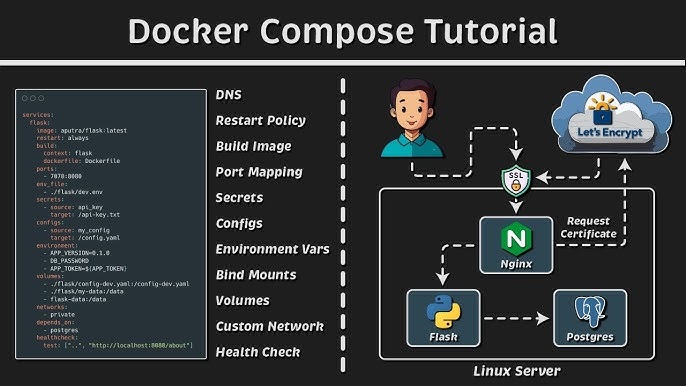
- DOCKER COMPOSE (Managing Multi-Container Applications)
- Use Cases of Volumes
- Use Cases of Networks
- Use Cases of Docker Compose
- Common Scenarios in DevOps
Volume: Used for durable data storage that persists even when containers are removed. Network: Enables internal container communication in a secure, virtual LAN-like environment. Compose: Manage an entire application stack (containers, volumes, networks, etc.) with a single YAML file and command.
Compose: Application Stack Management
- Manage an entire application stack (containers, volumes, networks, etc.) with a single YAML file and command.
VOLUMES (Persistent Data in Docker)
1. Concept
- A Volume acts as an "external hard drive" for containers. When a container is deleted, the volume data remains.
- Without volumes, all data (e.g., database, files, logs) stored inside the container is lost upon container removal.
2. Why Use Volumes?
- Long-term storage for data such as databases, logs, uploaded files, images, etc.
- Easy to back up and restore.
- Shared data access between multiple containers.
NETWORKS (Networking in Docker)
1. Concept
A Docker Network is a virtual network that connects containers with each other and optionally to the external world.
2. Basic Network Types
bridge: (default) – containers on the same bridge network can communicate via container names.host: the container uses the host machine’s network interface (rarely used in production).none: completely isolated with no network access.custom bridge: custom-defined bridge network to isolate groups of containers for better security and management.
DOCKER COMPOSE (Managing Multi-Container Applications)
1. Concept
- Docker Compose allows you to define multiple containers (services), networks, and volumes in a single
docker-compose.ymlfile. - Start, stop, or destroy the entire stack with just one or two commands.
2. Example
version: '3'
services:
  db:
    image: postgres:15
    volumes:
      - dbdata:/var/lib/postgresql/data
    environment:
      POSTGRES_PASSWORD: mysecret

  web:
    build: .
    ports:
      - "8080:80"
    environment:
      DATABASE_URL: postgres://postgres:mysecret@db:5432/postgres
    depends_on:
      - db

volumes:
  dbdata:
Use Cases of Volumes
-
Secure and Persistent Storage: Services such as databases (Postgres, MongoDB, MySQL), queues (RabbitMQ, Redis), or applications generating logs/files should use volumes to prevent data loss during container deletion, restarts, or upgrades.
-
Simplified Backup/Migration: Easily back up volume data using
cp,rsync, ortar. Migrate volumes to another server for infrastructure upgrades. -
Shared Data Across Services: Multiple containers can read/write to the same volume — for example, a backend app writes files, while another service (e.g., scanner or analysis) reads them.
Use Cases of Networks
-
Service Isolation and Security: When deploying microservices, group services (web, db, cache, queue, monitoring...) into separate networks. For instance, frontend can only access backend, while backend has permission to access the database — minimizing attack surfaces.
-
Production-like Simulation: Easily mock a production environment where applications interact over internal DNS, enabling realistic integration testing.
-
Testing Scaling and Failover: Attach services to multiple networks, simulate load balancing, and test high availability/disaster recovery without affecting the real infrastructure.
Use Cases of Docker Compose
-
Full Stack Application Management: With a single
docker-composecommand, DevOps teams can spin up entire environments (web, db, cache, monitoring, logging...) without manual setup. -
Automated Environments for Dev/Test/Staging: New developers or testers can start the full environment with just
docker-compose up, avoiding complex local setups. -
CI/CD Integration: In build/test pipelines (GitHub Actions, GitLab CI...), Docker Compose is used to spin up temporary environments for unit, integration, or smoke testing before deploying to production.
-
Simple Rollback and Recovery: Use
docker-compose down/upto reset the entire stack to its original, clean state defined in version-controlled YAML files. -
Service Scaling and Load Testing: Scale services easily using
docker-compose up --scale web=5to test application behavior under load.
Common Scenarios in DevOps
-
Building and Testing Microservices: Run multiple service instances (e.g., APIs, databases, queues, proxies) simultaneously for integration testing before release.
-
Infrastructure Debugging and Isolation: Easily isolate and debug issues by stopping specific containers or networks.
-
Automated Deployment: Store standardized Compose files in repositories. Everyone in the team can deploy identical environments, eliminating “it works on my machine” issues.
-
Security and Penetration Testing: Only expose necessary ports; internal services remain hidden inside the Compose network, reducing the risk of external exploits.