- What Is a Pod in Kubernetes?
- What Is a ReplicaSet?
- Relationship: Pod vs. ReplicaSet vs. Deployment
- Real-World Application for DevOps
What Is a Pod in Kubernetes?
Definition
- A Pod is the smallest and most basic deployable unit in Kubernetes.
- A Pod contains at least one container — typically just one — but it can include multiple tightly coupled containers (e.g., an app with a sidecar).
- All containers within a Pod share the same network, storage volumes, and internal IP, allowing them to communicate with each other via
localhost.
Characteristics
- Pods are ephemeral in nature. When a Pod dies, it is completely removed and may be replaced by a new Pod with a different ID.
- A Pod should not be treated as a durable object. Instead, use higher-level abstractions like ReplicaSet or Deployment for lifecycle management.
- When a Pod stops or crashes, any newly created replacement Pod will have a different IP address and DNS name.
Simple Pod Creation
A basic Pod can be created with a YAML manifest defining a single container, such as one running
nginxorbusybox. But in practice, Pods are usually created and managed via higher-level controllers.
apiVersion: v1
kind: Pod
metadata:
  name: nginx-pod
  labels:
    app: nginx
spec:
  containers:
    - name: nginx
      image: nginx:alpine
      ports:
        - containerPort: 80
When to Use Multiple Containers in a Pod
-
Only when containers need to:
- Share volumes
- Share network
- Operate in the same lifecycle
-
Common use cases include:
- Sidecar containers (e.g., log shipper, proxy)
- Helper tasks or tightly coupled service processes
Example Pod with Multiple Containers (Main + Sidecar)
apiVersion: v1
kind: Pod
metadata:
  name: app-with-sidecar
  labels:
    app: myapp
spec:
  containers:
    - name: main-app
      image: myapp:latest
      ports:
        - containerPort: 8080
    - name: sidecar-logger
      image: busybox
      command: ["sh", "-c", "while true; do echo logs; sleep 5; done"]
What Is a ReplicaSet?
Definition
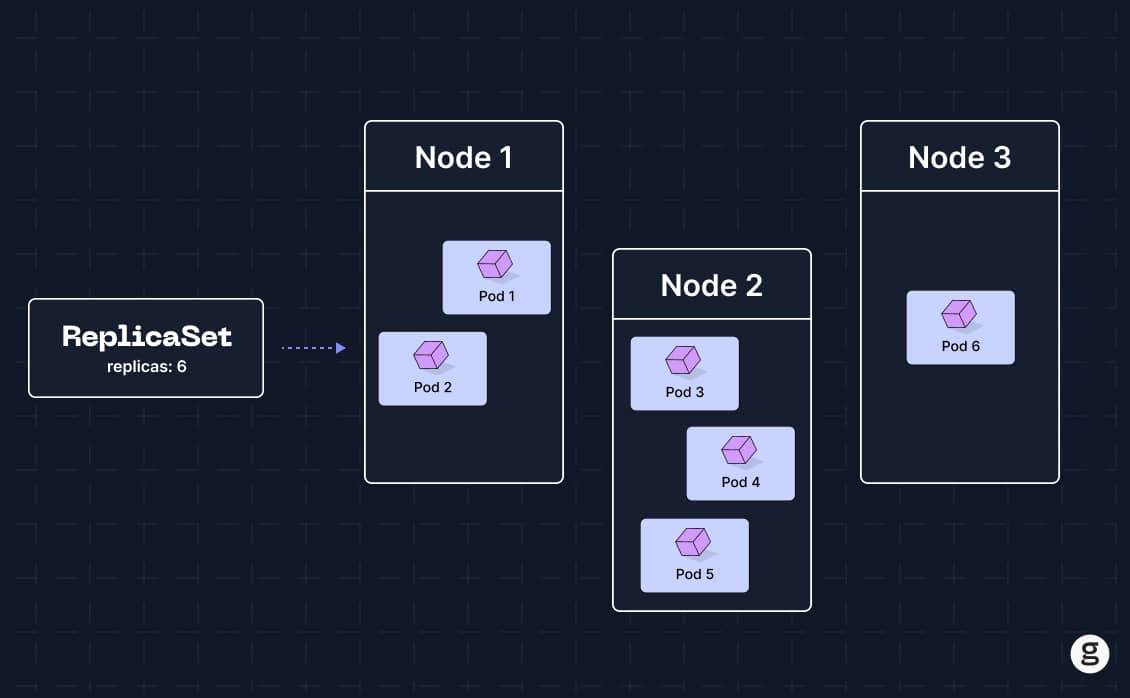
- A ReplicaSet (RS) ensures that a specific number of Pod replicas are always running at any given time.
- If a Pod crashes or more Pods exist than required, the RS will automatically create or delete Pods to match the desired count.
Characteristics
- ReplicaSets are primarily used by Deployments and rarely managed directly unless in advanced use cases.
- RS helps maintain availability and can work with Horizontal Pod Autoscalers (HPA) to support dynamic scaling.
- Pods are associated with a ReplicaSet using labels and selectors.
Example Use Case
- Create a ReplicaSet that ensures three Pods are always running with the image
nginx:alpineand labeledapp=myapp. - If any of the Pods fail or get deleted, the ReplicaSet will immediately replace them to maintain the count.
apiVersion: apps/v1
kind: ReplicaSet
metadata:
  name: nginx-replicaset
spec:
  replicas: 3
  selector:
    matchLabels:
      app: myapp
  template:
    metadata:
      labels:
        app: myapp
    spec:
      containers:
        - name: nginx
          image: nginx:alpine
          ports:
            - containerPort: 80
Relationship: Pod vs. ReplicaSet vs. Deployment
| Component | Responsibility |
|---|---|
| Pod | Runs container(s); does not self-heal or auto-scale. |
| ReplicaSet | Maintains the desired number of Pod replicas; does not handle versioning or upgrades. |
| Deployment | Higher-level abstraction. Manages versioning, rollouts, rollbacks, and leverages RS internally to ensure reliable deployments. |
Real-World Application for DevOps
- Ensures high availability of services by maintaining a stable number of running Pods.
- Enables easy scaling by adjusting the number of replicas.
- Provides fault tolerance by automatically replacing failed Pods.
- Supports integration with load balancers and auto-scalers, making it essential in modern CI/CD and production environments.